

Mindoff Dataport
A Python Package to extract xlsx templates with full visual fidelity and render data-driven reports in xlsx and PDF formats.

Purpose
Legal and business reporting often requires client-specific formatting that is tedious to replicate in code. Mindoff Dataport was built to let teams design reports once in Excel, bind live data to those designs at runtime, and export consistent XLSX and PDF outputs reliably at any scale.
- Built
- Form
- python package
- State
- active
Brief
Mindoff Dataport is an open-source Python library that turns styled Excel workbooks into reusable report templates and exports polished XLSX and PDF outputs from the same source, handling millions of rows without memory bloat. You design a report in Excel, mark cells with placeholder syntax, and the library fills those cells with live data and exports production-ready XLSX and PDF files.
The problem
The trigger was a recurring client demand: legal reports customized per entity, where some clients also needed to make their own visual updates to the layout. The data had to be pulled live from a database, and the output had to look exactly right every time.
Building those reports from scratch in code proved brittle. Every format change meant rewriting cell-by-cell logic across openpyxl or xlsxwriter. Replicating a client's Excel layout precisely, headers, merged cells, borders, fonts, required painstaking handcrafting that broke the moment the template changed. And doing this separately for both Excel and PDF outputs meant maintaining two diverging codebases for the same report.
The real cost was time. There was no scalable path to onboarding new report designs without significant engineering effort each time.
Approach
Template extraction as the foundation
The central decision was to treat an actual Excel workbook as the source of truth for layout and styling. Rather than rebuilding report designs in Python, the library reads the .xlsx file directly, extracts cell styles, merged regions, dimensions, and placeholder markers, and stores all of it in a WorkbookSchema. Template authors work in Excel the way they normally would. Engineers never touch the layout code.
Placeholders follow a {{key:type}} syntax placed directly in cells. The extractor reads them and builds an input contract that clearly states what data each sheet expects before any export runs.
A three-stage pipeline
The workflow splits cleanly into three stages: extract() once to read the template, compile() to bind data to it, and export() to write the file. The intermediate ReportBundle is a portable directory containing a manifest, resolved cell data as JSON, and dataframe sources as Parquet. This means a bundle compiled once can be exported to XLSX and PDF separately, re-exported later without rerunning compilation, or passed between processes.
Two XLSX export modes for different scale requirements
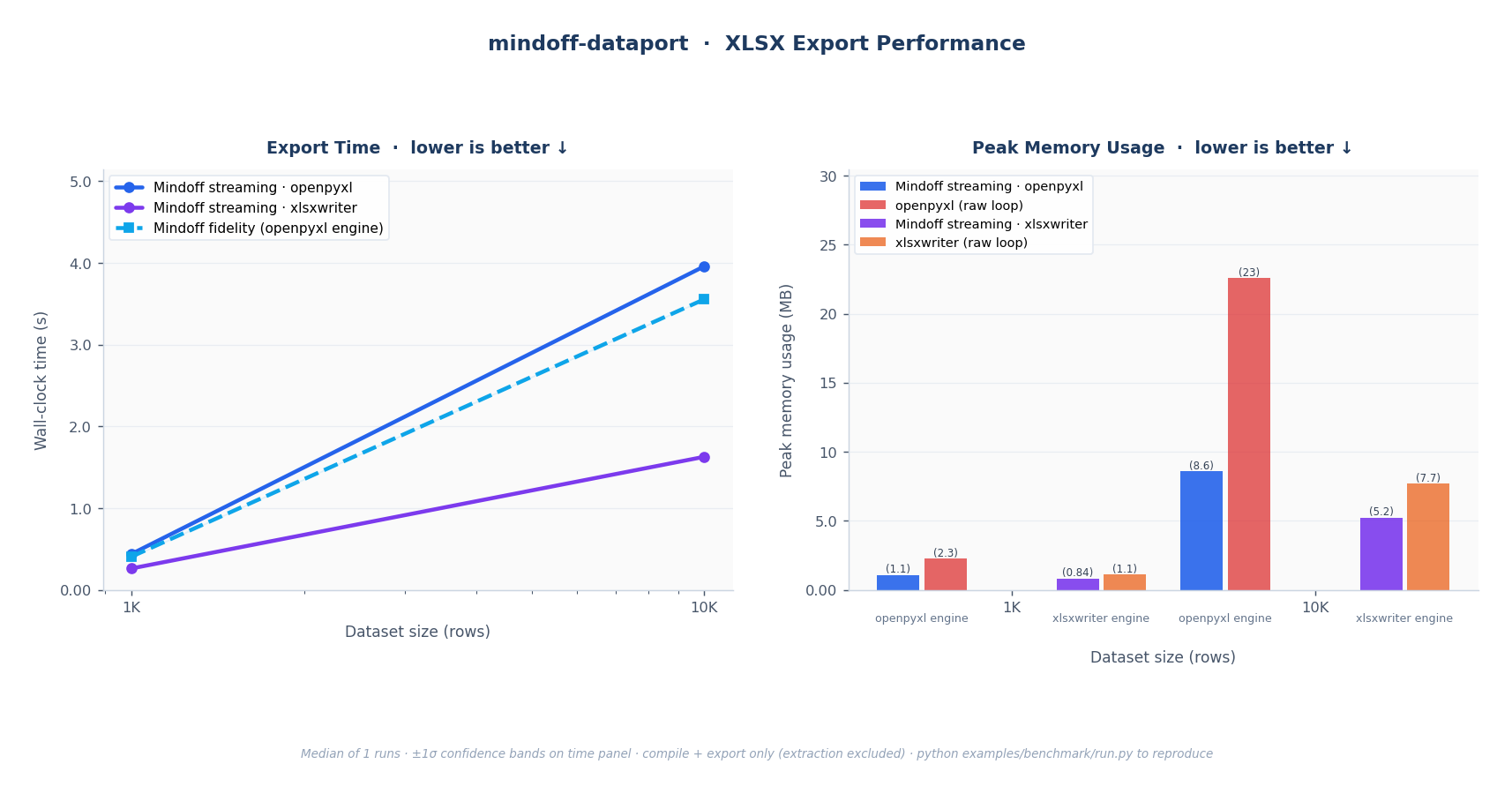
For smaller outputs requiring full style fidelity, including merged cells and every style property, the library renders everything in memory. For large datasets, a streaming mode reads Parquet in configurable batches (default 50K rows) and writes incrementally, holding peak memory near-constant regardless of dataset size. The benchmarks show this clearly: openpyxl and xlsxwriter raw loops grow linearly with row count; streaming mode stays flat.
Both modes use the same template schema and produce consistent outputs. The xlsxwriter engine was added alongside openpyxl specifically for streaming speed, and significant work went into ensuring both engines produce visually equivalent results.
Native PDF over conversion
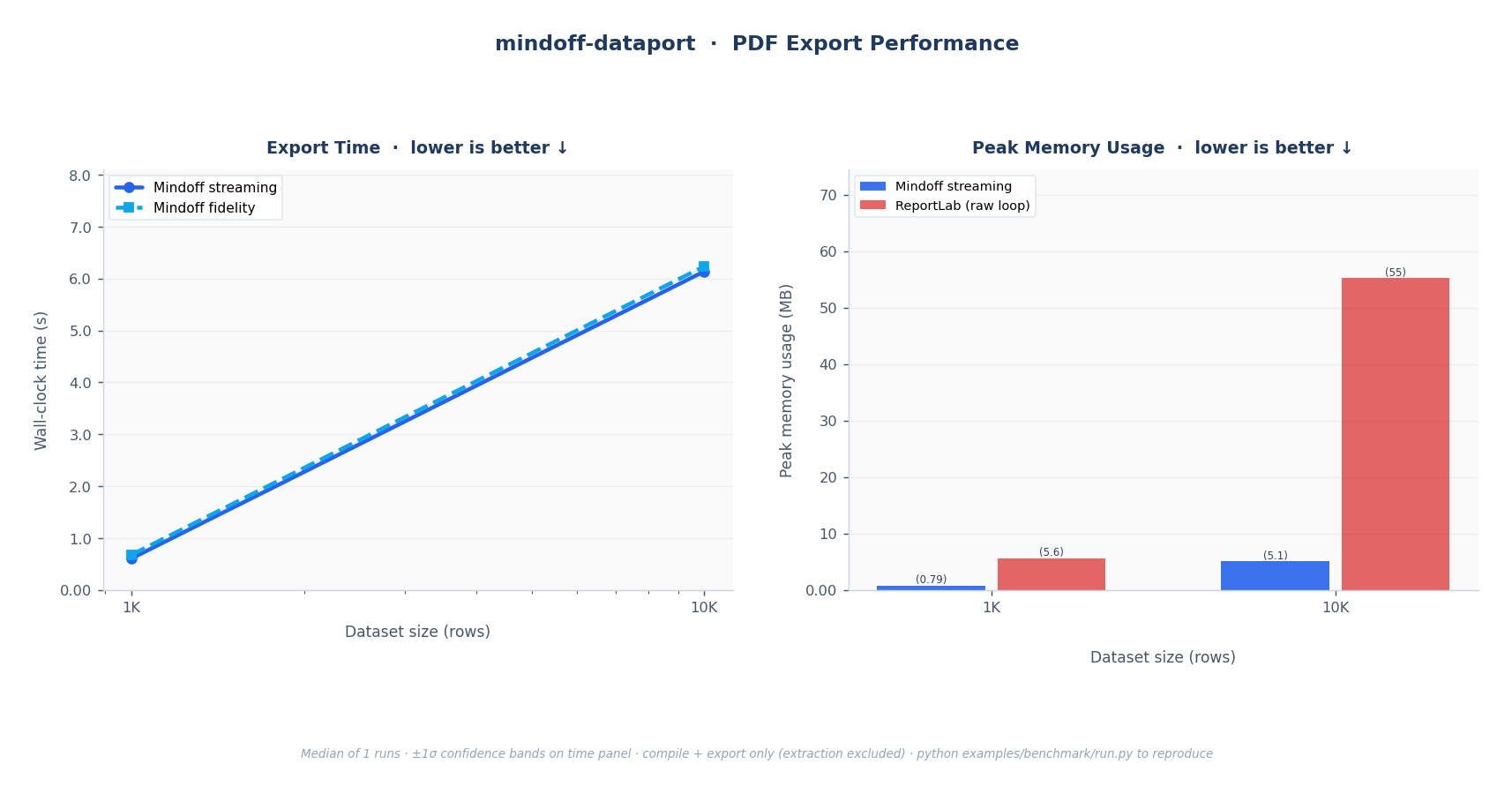
Early on, there was a decision to make on PDF: convert the finished Excel file, or build the PDF natively. Conversion was the simpler path but failed on two counts. It did not meet the performance requirements at scale, and it gave up control over the output. Native PDF generation via ReportLab was the only path to reliable pagination, precise layout control, and the ability to tune every element of the rendered page.
Key challenges
The hardest sustained problem was color fidelity across three output engines: openpyxl, xlsxwriter, and ReportLab. Excel stores many colors as theme references rather than hex values, using a palette index combined with a tint modifier. ReportLab has no concept of this. Getting consistent color output required mapping Excel's theme palette to concrete ARGB values and applying tint calculations manually before passing anything to ReportLab.
The streaming architecture also required careful constraint design. Merged cells cannot span dynamically generated rows in streaming mode because row count is not known ahead of time. The library validates these constraints at compile time, before any file is written, so errors surface early with clear messages rather than mid-export failures.
Supporting Polars LazyFrames as first-class inputs was a deliberate choice for large-data workflows. A LazyFrame stays disk-backed through compilation and is only materialized at export time, in batches. This keeps the compile step lightweight even when the underlying dataset is larger than available RAM.
What was built
- Template extraction: reads any
.xlsxworkbook and produces aWorkbookSchemacapturing styles, merges, dimensions, and placeholder contracts - Scalar and dataframe placeholders: string, number, date, boolean, and three dataframe anchor types for flexible table layouts
- Repeat sections: generate one block per record in an ordered list, with per-block scalars and dataframes
- Dynamic sheets: expand a single template sheet into multiple named output sheets from one payload dict
- XLSX fidelity export: full in-memory render with merged cells, all style properties, and manual page breaks
- XLSX streaming export: near-constant peak memory for large datasets, with optional workbook splitting via
max_rows_per_workbook - PDF export: native ReportLab rendering with configurable page size, orientation, margins, custom TrueType fonts, and dataframe header repetition across pages
- ReportBundle persistence: compile once, export later, reuse across processes
- Polars LazyFrame support: disk-backed inputs materialized in batches at export time
template = mo_dataport.extract("invoice_template.xlsx")

bundle = mo_dataport.compile(
    template,
    data={
        "Invoice": {
            "customer_name": "Acme Industries",
            "invoice_number": 1024,
            "line_items": pl.scan_parquet("line_items.parquet"),
        }
    },
)

mo_dataport.export(bundle, "invoice.xlsx")
mo_dataport.export(bundle, "invoice.pdf", format="pdf")
The template is the contract. If it renders correctly in Excel, it renders correctly in the export.
Outcome
Mindoff Dataport is live and actively processing millions of rows in production, serving mainstream enterprise clients through the Mindoff Django platform. The library handles the full reporting layer for client-customized legal and business documents, where output consistency is a requirement, not a nice-to-have.
It is published as an open-source package on PyPI and benchmarked at scale against raw openpyxl, xlsxwriter, and ReportLab loops. The streaming mode holds constant memory where alternatives grow linearly. The fidelity mode covers cases where merged cells and full style support are non-negotiable.
Learnings
Getting color consistency across three rendering engines without a shared color model exposed just how much Excel's theme system is taken for granted. The fix was mechanical once understood, but finding it required tracing rendering bugs across openpyxl's internal palette representation, Excel's OOXML spec, and ReportLab's drawing primitives. The lesson was that fidelity across formats is never free. Every abstraction boundary is a place where something quietly breaks.